Brute forcing my way to better HTML → DOCX conversion
By Blair Googer · The dom-docx origin story · July 2026 · also on dev.to
Ten years ago Vue.js hooked me on front-end JavaScript. The reactivity, the hot reload and the elegant API made the whole developer experience a joy. Thousands of hours later I'm still in love. But much of my work is backend, and one task I always dread is updating Word document templates and the related generation code. The feedback loop is slow and debugging is painful. I would much rather build documents the way I build web pages. Unfortunately, the existing HTML-to-DOCX libraries leave a lot to be desired, and I never had the motivation to build something better.
Then I started having success with Karpathy Autoresearch loops on a couple of other things, and the idea hit me. Can I brute-force my way to a high fidelity HTML-to-DOCX converter?
A few days later, dom-docx was born.
Autoresearch
Autoresearch loops are a general concept. You use an AI agent to kick off a recursive self-improvement loop against something that can be objectively scored. For example, say you have a slow SQL query (speed being the metric). You could kick off a loop with a prompt like:
We are using autoresearch loops to improve SQL performance. Run the following SQL query to establish a baseline, then come up with hypotheses to improve performance. Score each result and run 5 iterations. Avoid any regressions, each result must contain the exact same rows and columns.
Running the above prompt would kick off a loop that would iteratively improve the SQL query's performance, scoring and recursing after each iteration. This isn't exactly classical brute forcing, but it's a similar concept of autonomous iterations trying to improve within a constrained objective.
Autoresearch is a very accessible form of machine learning. There's no training run and no GPUs, just a metric, a loop and some monitoring that almost any developer can do with a standard workstation.
How the dom-docx loop actually works
For HTML-to-DOCX conversion, the scoring loop needed a way to judge "is this a good Word document" that a machine could evaluate without a human eyeballing every output. The approach:
- Render a batch of HTML test cases (headings, lists, tables, flex rows, images, inline formatting, stylesheets, etc.) in Playwright and take a screenshot
- Convert each to
.docxand take another screenshot via LibreOffice - Compare the Playwright-rendered screenshot against the screenshot of the dom-docx output
- Score each case as 50% visual/layout fidelity, 35% editability (real Word structure, not a 1×1 layout table pretending to be a document), 15% compile speed
- Feed results back in, adjust the conversion logic, repeat
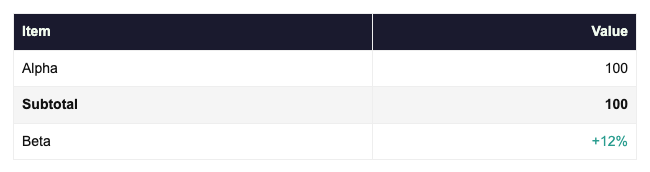
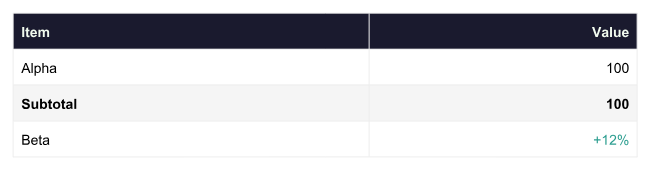
After setting up the harness and initial test cases, the results started to improve quickly. I added a side-by-side screenshot as part of the test case output as well to easily inspect the results and decide what to focus the agents on. Images, flex layouts, tables, divs, lists, etc. were all solved in short order. The best part is that the scoring harness provides a safety blanket, making new features easy to add while guarding against regressions in existing functionality.
Two classic ML failure modes still apply, though. One is the asymptote. Early iterations buy quick gains, then scores flatten and the juice stops being worth the squeeze. The other is overfitting. Optimize against a fixed suite long enough and you risk building a converter that's great at test case fragments and not real-world HTML.
Once the core test cases were in a good spot, a wild corpus of pages pulled from the live web was also converted to DOCX and scored (news articles, a Craigslist page, marketing email templates, a Project Gutenberg novel, a Hacker News thread, an RFC, and tables from Wikipedia). After more fixes and improvements, most of those scored in the 90s.
The results
I benchmarked dom-docx against the established OSS HTML-to-DOCX converters on npm: html-to-docx (~337k weekly downloads) and its actively maintained fork
@turbodocx/html-to-docx, both solid, widely used pure-JS libraries with no headless browser requirement, using the same scoring harness across 40+ real-world test cases.
A few things stood out once the numbers came in:
- dom-docx produced schema-valid OOXML on every case in this harness, which held up as the clearest gap.
- Average layout-fidelity score in the mid-90s percent, versus the mid-60s for the alternatives tested.
- The biggest gaps show up exactly where you'd expect: nested lists inside blockquotes, table row backgrounds, flex layouts, inline SVG. Simple stuff (a plain paragraph, a centered paragraph) is roughly a wash across the board, which makes sense since that's the easy 20% every converter gets right.
- dom-docx trades some raw compile speed for it (~50ms avg vs the high-teens ms range), worth knowing if you're converting at very high volume, though for most document-generation use cases that's not the bottleneck.
Here are five example cases from the scoring suite:
inline-svg-chartnested-blockquotes-liststable-row-backgroundstable-cell-paddingplain-paragraphplain-paragraph is included deliberately as one of the four cases where the incumbents edge dom-docx, all by less than half a point.View this data as a table
| Test case | dom-docx | html-to-docx | @turbodocx |
|---|---|---|---|
inline-svg-chart |
97.03 | 7.21 | 9.83 |
nested-blockquotes-lists |
91.48 | 12.11 | 11.51 |
table-row-backgrounds |
98.73 | 29.81 | 72.19 |
table-cell-padding |
97.15 | 62.83 | 61.61 |
plain-paragraph |
96.84 | 96.98 | 96.99 |
The full per-case breakdown, named comparisons and methodology are public: BENCHMARK.md and SCORING.md.
Try it
npm install dom-docxRequires Node ≥ 20. The default path is pure JS, no browser or Playwright needed.
import { writeFile } from "node:fs/promises";
import { convertHtmlToDocx } from "dom-docx";

const html = `
<h1 style="color:#1a1a2e">Quarterly Report</h1>
<p>Revenue grew <strong>12%</strong> year over year.</p>
<ul>
  <li>North America</li>
  <li>EMEA</li>
</ul>
`;

const docx = await convertHtmlToDocx(html);
await writeFile("output.docx", docx);
Browser (runs entirely client-side, no Playwright):
import { convertHtmlToDocx } from "dom-docx/browser";

const blob = await convertHtmlToDocx(html);
const a = document.createElement("a");
a.href = URL.createObjectURL(blob);
a.download = "output.docx";
a.click();
CLI, no code required:
npx dom-docx input.html -o output.docx
cat fragment.html | npx dom-docx - -o -   # stdin to binary stdout, for pipelines
There's also a live demo if you want to test HTML with it in the browser first.
Where this is headed
A growing share of the HTML hitting a converter like this is LLM-generated: agents building reports, retrieval-augmented generation pipelines writing summaries and shipping them as Word documents. I added an AGENTS.md that documents which HTML patterns convert cleanly and which to avoid, so an agent authoring the HTML can get it right the first time instead of producing DOCX-breaking markup and finding out after the fact.
The project lives at github.com/floodtide/dom-docx and is MIT licensed. Stars, issues and PRs welcome. I'd genuinely like to hear where it breaks for you.
Keep going
- Live converter — paste HTML and download a .docx in your browser
- Showcase examples — invoices, dashboards, contracts and essays
- Learn — copy-paste examples for the most common integration paths